How to read books in a foreign language without a monthly subscription or ads
Buy SagaWise Reader Lifetime once and connect the AI service you already use. Words and paragraphs are translated through your own account, so there is no monthly fee and no ads.
Set it up in four steps
1
Install SagaWise Reader
Get it from Google Play and choose your native language on the first launch.
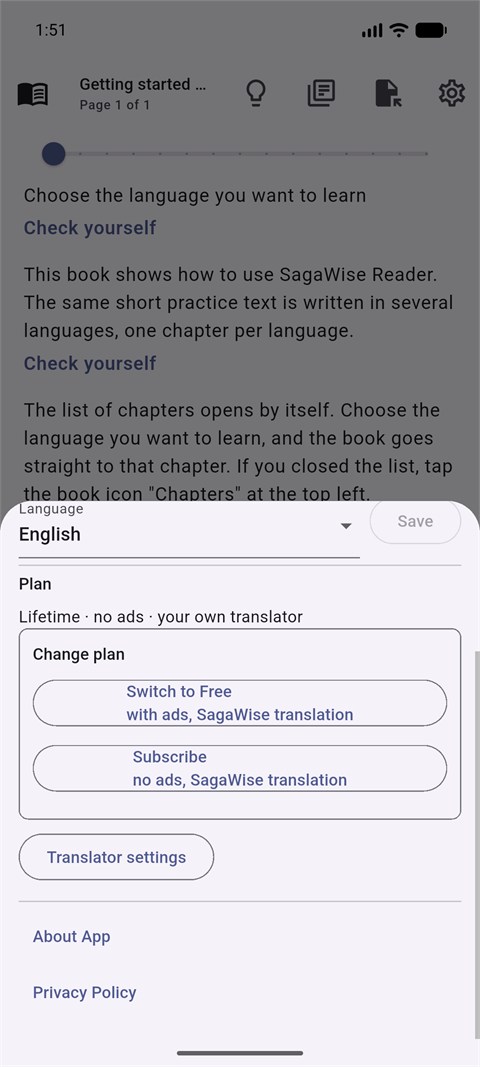
Settings: the Plan section with Lifetime2
Buy Lifetime once
Open Settings and choose Lifetime in the Plan section. It is a one-time payment, not a subscription.
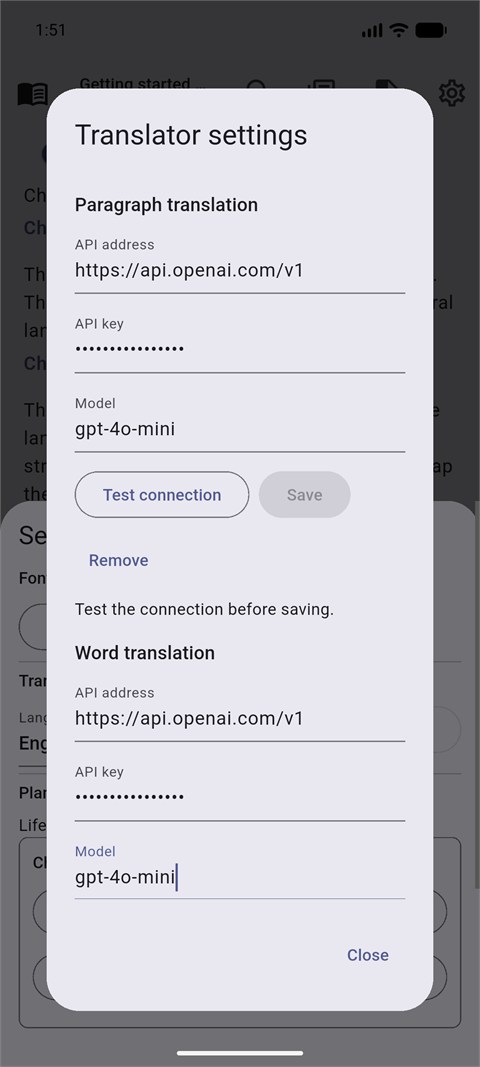
Translator settings: API address, API key and Model3
Connect your AI service
Translator settings opens. For Word translation and for Paragraph translation, enter the API address, API key and Model of your service, tap Test and save.
4
Read
Words and Check yourself paragraphs are now translated by your service. The app shows no ads.
The connection test sends one real request to your service and may use a few paid tokens.
What you need
An account with an AI service that offers an OpenAI-compatible API, and an API key from it. The API address must start with https://. You can use the same service for words and paragraphs or different ones, for example a cheaper model for words and a stronger one for paragraphs.
Why it pays off
One payment
You pay a modest sum once and keep the plan for life.
No ads
Reading is never interrupted by banners or rewarded ads.
Your service, your choice
You pick the provider and the model and pay it directly for what you actually use. Translations go from your phone straight to your service.